Intro to Travel One
Travel One compares Away, the city you're in, with Home, the city you live in. Convert currency and units, see the time back Home, and check weather, tax and plugs, all on one board. Flip Home and Away with one tap, and save the cities you visit, plus My Location.
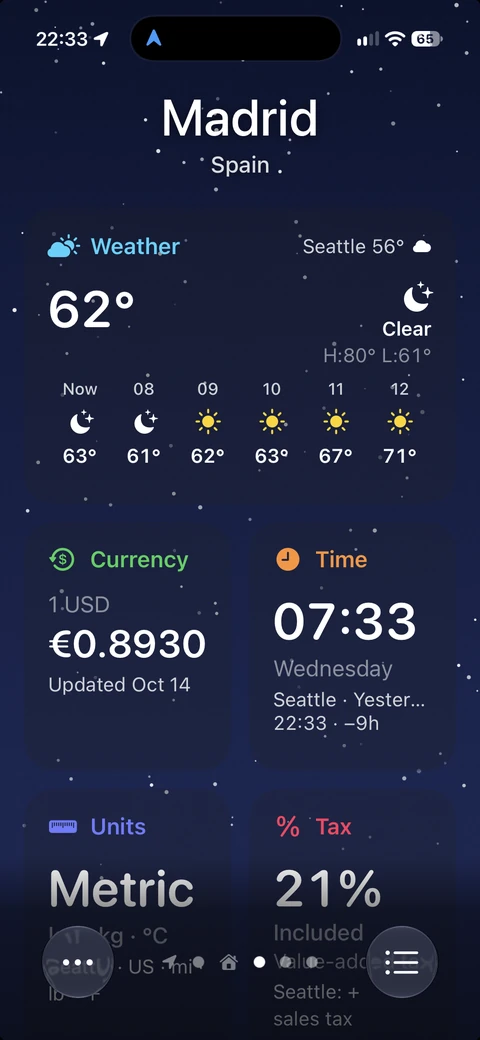
How the board works
Each page of the board is one city, Away. Every tile shows the Away value large, with your Home value on the line below: currency, units, time, weather, tax, and plugs and power.
Highlights
Do any of the following:
- Flip Home and Away with one tap: Tap the city name and every tile shows Home first. See Flip Home and Away.
- Save the cities you visit: Save the places you're going, plus My Location, and swipe between them.
- Add widgets: Put Weather, Currency, Time, Units or Tax on your Home Screen, and Weather, Currency or Time on your Lock Screen. See Use Travel One widgets.
Note: Travel One has no account or sign-in. Your cities and layout stay on your iPhone.